
Good tools. Great work.
All inside your browser.
Consolidate 40+ single-purpose extensions into one clean, approachable toolbox. Built for developers, designers, and web power users—inspect, test APIs, format JSON, and capture pages with 100% local execution.
Designed for Speed. Engineered for Pros.
Everything you need to inspect, debug, format, and audit web pages without cluttering your browser with a dozen fragmented extensions.
Replace 40+ Bloated Extensions
Consolidate color pickers, JSON formatters, REST testers, SEO inspectors, and font tools into one single 47-tool extension. Free up your Chrome memory and browser toolbar.
Instant ⌘K Command Palette
Summon Auzaar Pro anywhere on the web with a simple keystroke. Find, switch, and launch tools instantly with fuzzy search or dedicated global keyboard shortcuts.
100% Privacy & Local Execution
All tools execute locally inside your browser. No API keys or authorization payloads sent to third-party tracking servers. Zero telemetry, zero cloud dependencies.
Isolated Shadow DOM Rendering
The extension overlay injects through an encapsulated Shadow DOM. It never interferes with, overrides, or breaks the CSS or DOM structure of the websites you browse.
Unified Design & Developer System
Enjoy one clean, modern interface across every utility. No discordant styles, popups, or jarring context switches between different developer tools.
Built for Real Day-to-Day Tasks
From testing mock API payloads to inspecting broken links, downloading markdown from documentation, or measuring CSS bounding boxes—Auzaar Pro is ready out-of-the-box.
See the Extension in Action
Real interfaces designed for focused productivity. Fast, keyboard-driven, and built right into your browser.
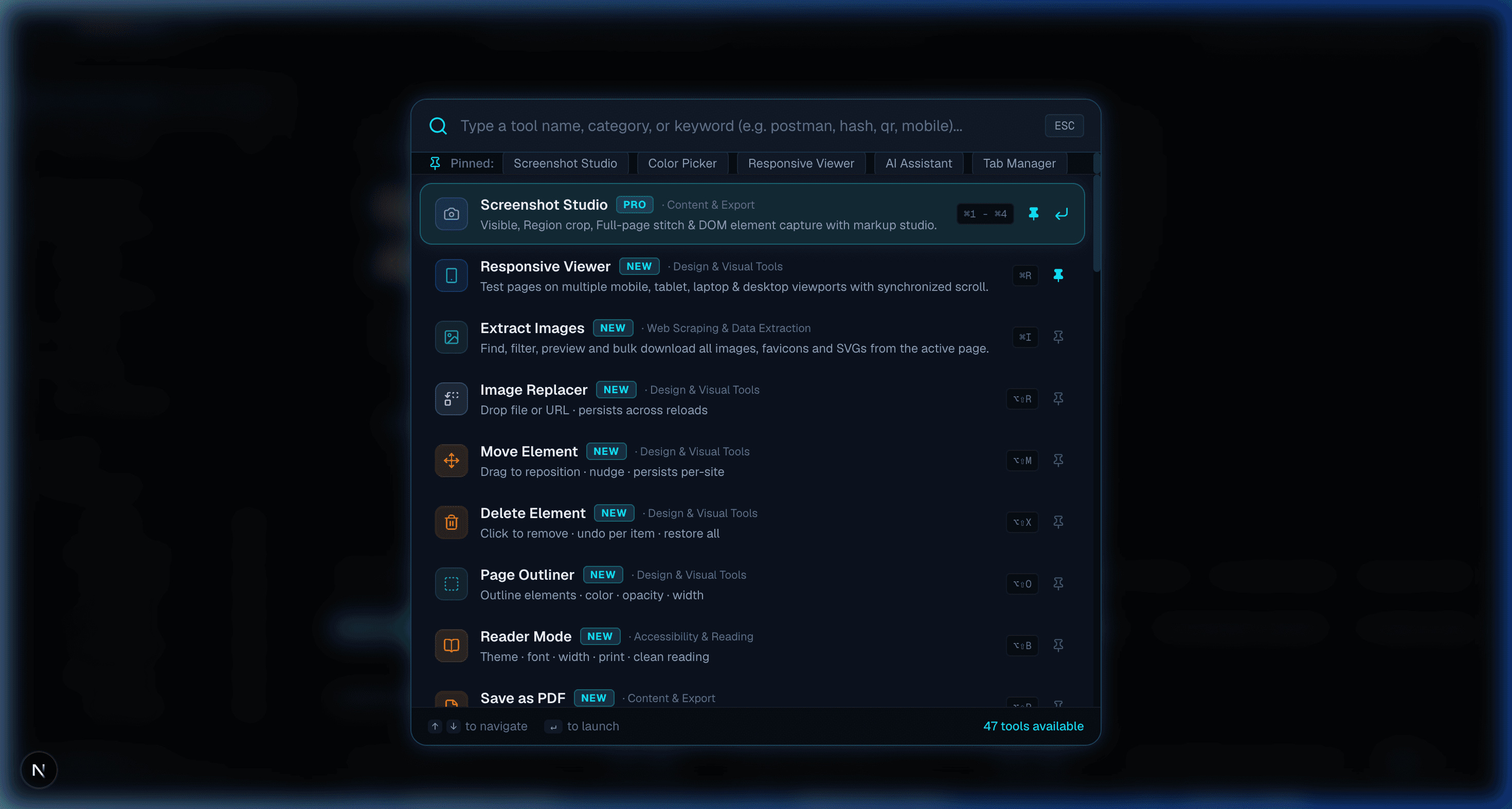
Instant ⌘K Command Palette on Any Webpage
Press ⌘K anywhere on the web to summon the fuzzy-searchable toolbox. Jump into color pickers, CSS inspectors, responsive viewers, or scrapers in under a second.
Genuine screenshot from the Auzaar Pro Chrome extension.
Explore All 47 Built-in Tools
Every utility runs natively inside your browser through the Chrome extension. No external accounts, no cloud dependencies, and zero configuration required.
Screenshot StudioPro
Visible viewport, region crop, full-page stitching, and DOM element capture with social markup studio.
Responsive ViewerPopular
Test pages on synchronized mobile, tablet, laptop, and desktop viewports with dual scrolling.
Extract Images
Find, filter, preview, and bulk-download all images, favicons, and SVGs from the active tab.
Image Replacer
Drag-and-drop replacement images or URLs onto active webpage slots; persists across reloads.
Move Element
Visual drag-and-drop to reposition page components, nudge with arrow keys, and save per-site.
Delete Element
Click to remove sticky banners, modals, and ads with single-item undo and 1-click restore all.
Page Outliner
Highlight element boundaries and CSS box models with customizable colors, opacity, and width.
Reader Mode
Clean reading experience stripping clutter, with typography controls, themes, and clean printing.
Save as PDF
Clean print preview and instant PDF export with A4/Letter sizing and margin adjustments.
Table Capture
Scans all HTML tables on the page with 1-click export to CSV, TSV, JSON, and Markdown.
API TesterPopular
Send GET, POST, PUT, DELETE, PATCH requests with headers, query params, history, and CORS-free calls.
Broken Link Checker
Concurrent HEAD/GET crawler verifying link health, categorizing 200, 3xx, and 404s with CSV export.
Webpage → Markdown
Convert page content or picked DOM elements to clean GitHub-flavored Markdown with live preview.
Todo List
Domain-attached developer task list with priority filters, completion states, and local persistence.
Sticky Notes
Drop virtual, draggable notes on any webpage that stay anchored when you return to the URL.
Color Picker
EyeDropper screen pixel sampler, contrast ratio calculator, HEX/RGB/HSL converter, and palette exporter.
World Clock
Track international client and team time zones with relative hour offsets and digital clocks.
QR Code Studio
Generate stylized QR codes for active URLs, WiFi, or text, plus a scanner to decode images or webcam.
Picture-in-Picture
Pop out any HTML5 video into an always-on-top floating player with speed controls and stream support.
JSON FormatterPopular
Format, validate, repair, and explore JSON with interactive collapsible tree views and syntax highlight.
Page Speed
Analyze real-time Core Web Vitals (TTFB, FCP, LCP, CLS), page weight breakdown, and asset distribution.
Web Scrape
Visual scraper auto-detecting tables, lists, and repeated product cards with live CSV/JSON export.
SEO Meta Audit
On-page SEO audit for titles, meta descriptions, Open Graph, Twitter cards, headings, and alt tags.
Internet Speed Test
Measure download speed, upload bandwidth, ping latency, and packet jitter with visual speedometer gauge.
Site Stack
Technology stack detector identifying client frameworks, CMS, analytics, CDNs, and server engines.
Export Element
Select any element to isolate its HTML and matched computed CSS, ready to export into CodePen.
Color Palette
Extract every color hue, background, and border across the page, with highlight indicators for usage.
List Fonts
Detect every font family and weight loaded on the page, with glyph samples and usage locators.
Ruler & Measure
Click and drag to measure pixel distances, angles, ΔX and ΔY between any points on screen.
URL Opener
Bulk URL launcher with configurable interval delays, batch chunking, and pause/resume controls.
Cookie Editor
Full cookie inspector to search, add, edit, and delete cookies, inspect flags, and export JSON.
CSS Inspector
Live box-model inspector for computed styles, cascade rules, specificity, and layout dimensions.
Layout Tools
Visual debugger for Flexbox and CSS Grid containers. Inspect gaps, alignments, and DOM hierarchy.
Accessibility AuditWCAG
WCAG 2.1 & 2.2 AA/AAA scanner auditing contrast ratios, alt text, ARIA landmarks, and form labels.
AI AssistantBYOK
Bring-Your-Own-Key (BYOK) on-page copilot supporting Gemini, Claude, OpenAI, Groq, and Ollama.
Font Changer
Preview 50+ Google Fonts live on any page element or globally with instant CSS @import generation.
Pattern Background
8 procedural CSS patterns (grid, blueprint, dots, isometric) with color controls and CSS export.
Dark Mode
Force clean high-contrast dark themes on any website with brightness and contrast sliders.
Code Injection
Inject custom JavaScript, CSS, and HTML snippets into any active page with auto-run persistence.
Live Text Editor
Turn any webpage into an editable canvas. Rewrite headlines, test copy, and export updated HTML.
Tab Manager
Search, filter, and organize open tabs across windows, detect duplicates, and export tab listings.
Clear Browsing Data
Quick-access privacy cleaner to selectively wipe cache, cookies, and local storage per site or globally.
Email Finder
Scans page text, mailto links, and obfuscated formats to extract emails grouped by domain with CSV export.
Encoder / Decoder
Convert Base64, URL, HTML, Hex, Unicode, decode JWT claims, and compute MD5, SHA-1, SHA-256 hashes.
Subreddit Insights
Community analytics displaying subscriber counts, rules, top posts, and 7×24 Best Time to Post heatmaps.
Reddit User Analyzer
Profile auditor showing karma distribution, account age, top participating subs, and submission cadence.
Cross-Post Finder
Find niche subreddits where similar topics and discussions have historically scored high engagement.
Get all 47 tools in your browser today
Instant install from the official Chrome Web Store. Free and privacy-first.
COMPATIBILITY
Works on every browser
Install once and use Auzaar Pro across all your favorite browsers.
Chrome
Fast and secure browsing
Firefox
Open source and privacy-focused
Edge
Microsoft's modern browser
Brave
Privacy-focused browsing
Opera
Feature-rich browser
Arc
Calm, beautiful browsing
Vivaldi
Power-user customization
Up and Running in 3 Simple Steps
Install once from the Chrome Web Store and instantly unlock 47 developer and design utilities in your browser.
Visit Chrome Web Store
Open the official Auzaar Pro listing on the Chrome Web Store with one click. No sign-up or credit card required.
Add Auzaar Pro to Chrome
Click "Add to Chrome" to install the extension. Compatible with Google Chrome, Brave, Arc, Edge, and all Chromium browsers.
Press ⌘K & Start Working
Press ⌘K (or click the wrench toolbar icon) on any webpage to open the command palette and launch any of the 47 tools.
Pay once. Use forever.
Invest once in your daily browser workflow. Enjoy complete lifetime access with zero subscriptions or renewal fees.
Lifetime License
Pay once. Use forever. Complete access on up to 3 devices.
No recurring subscriptions or hidden renewal charges.
Everything Included:
Pay once. Use forever. Instant activation.
Frequently Asked Questions
Everything you need to know about the Auzaar Pro Chrome extension.
Ready to upgrade your browser workflow?
Install Auzaar Pro from the Chrome Web Store and get 47 instant developer, design, and productivity tools inside your browser.